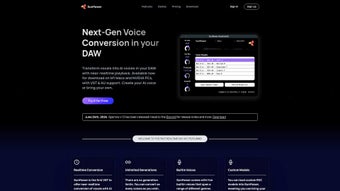

Download Sunflower Sparrow – AI Voice Transformer, VST/AU Plugin
Overview
Sunflower Sparrow is an innovative AI‑driven voice generator built specifically for music producers, podcasters, and sound designers who work inside a Digital Audio Workstation (DAW). By leveraging cutting‑edge neural synthesis, the tool can transform any vocal track into a completely new AI voice in near‑real‑time, allowing creators to experiment with endless vocal characters without ever leaving their DAW. The platform supports unlimited voice conversions, and every output is royalty‑free, meaning you can use the transformed vocals in commercial releases, film scores, games, or advertising without worrying about hidden fees.
Sunflower Sparrow also opens the door to community‑driven creativity: you can load custom voice models created by other users, mix‑and‑match timbres, or even train the engine on your own voice for truly personal sound design. Currently released as a VST3 and AU plugin for Apple Silicon (M1) Macs, the developers have announced a Windows version is on the roadmap, along with a performance mode that reduces latency even further. With an emphasis on ethical AI usage, Sunflower Sparrow includes safeguards to prevent misuse while encouraging fresh musical expression.
Whether you’re looking to replace a lead singer, add background harmonies, or craft an alien‑like narrator, Sunflower Sparrow offers a secure, flexible, and future‑proof solution for vocal transformation.
Key Features & Benefits
- Near‑real‑time voice conversion: Transform vocals instantly while the track plays, enabling on‑the‑fly experimentation.
- Unlimited royalty‑free outputs: No per‑track fees; all generated voices are cleared for commercial use.
- Custom model support: Import community‑created AI voice models or upload your own, expanding the sonic palette.
- Voice character editor: Adjust timbre, gender, age, and emotion sliders to sculpt entirely new personas.
- DAW integration via VST3 & AU: Works seamlessly with popular hosts such as Logic Pro X, Ableton Live, Reaper, and Cubase.
- Future‑ready performance mode: Planned low‑latency engine for live‑performance scenarios.
- Personal voice training (upcoming): Train the AI on your own vocal samples for a truly unique signature sound.
- Ethical safeguards: Built‑in usage policies and watermarking options to discourage malicious applications.
The feature set of Sunflower Sparrow is designed to address the biggest pain points in vocal production. Traditional pitch‑shifting or formant‑adjusting plugins often produce robotic artifacts, while re‑recording with different singers adds time and cost. Sunflower Sparrow eliminates those hurdles by providing a high‑fidelity, AI‑based engine that respects the musical intent behind each phrase.
The royalty‑free licensing model is especially valuable for indie artists and commercial studios alike; you can release a full album or a game soundtrack without worrying about downstream royalties. Moreover, the ability to load custom models means the community can share niche voice packs—think vintage radio announcers, sci‑fi alien dialects, or even historically accurate period accents—giving you a virtually limitless library without additional purchases. The upcoming performance mode and personal voice training promise to keep the plugin relevant for live streaming, virtual concerts, and brand‑specific voice branding, making Sunflower Sparrow a strategic investment for any forward‑thinking creator.
Installation, Usage & Compatibility
Getting Sunflower Sparrow up and running is straightforward, even if you’re new to AI‑driven plugins. Follow these steps for a smooth installation on your M1 Mac, and keep an eye on the roadmap for the upcoming Windows build.
Step‑by‑step installation
- Visit the official Sunflower Sparrow website and click the Download for macOS (M1) button.
- The installer package (
.pkg) will appear in yourDownloadsfolder. Double‑click to launch the installer. - Follow the on‑screen prompts, granting the necessary permissions for kernel extensions if prompted. macOS may request permission to access the “Security & Privacy” settings; approve the request to allow the plugin to load.
- After installation, open your DAW of choice. In the plugin manager, scan for new VST3 and AU plugins. Sunflower Sparrow should appear under “Audio Units” (AU) and “VST3” categories.
- Insert Sunflower Sparrow onto an audio track that contains a vocal recording. The UI loads quickly, displaying waveform preview, a Source Voice selector, and a set of transformation sliders.
Basic workflow
Once the plugin is loaded, you can either drag‑and‑drop a pre‑recorded vocal file into the interface or route the track’s output directly into Sunflower Sparrow for live conversion. Choose a voice model from the built‑in library or load a custom .sps model file via the “Load Model” button. Adjust the character sliders—pitch, timbre, breathiness, and emotion—to taste. Press the Play button; the engine will process the audio in near‑real‑time, letting you hear the transformed voice instantly. For more precise editing, you can render the processed track to a new audio file by clicking the “Render to Disk” option, which exports a high‑resolution WAV that remains royalty‑free.
Compatibility: Sunflower Sparrow currently supports macOS 11.0+ on Apple Silicon (M1/M2) chips, with both VST3 and AU formats. A Windows 10/11 x64 version is slated for release in Q3 2025, and Linux support is being evaluated based on community demand. The plugin works with any DAW that accepts VST3 or AU plugins, including Logic Pro X, Ableton Live 11+, Cubase, Studio One, and Reaper.
Pros & Cons
- Pros
- Instant, near‑real‑time voice transformation saves production time.
- Unlimited royalty‑free usage eliminates hidden costs for commercial releases.
- Custom model support encourages community creativity and expands sonic possibilities.
- High‑quality AI engine produces natural‑sounding vocals with minimal artifacts.
- Integrated voice character editor allows deep tonal sculpting without external tools.
- Ethical safeguards promote responsible AI usage.
- Future‑proof roadmap (performance mode, personal voice training, Windows support).
- Cons
- Currently limited to Apple Silicon Macs; Intel‑based macOS users need Rosetta emulation.
- Windows version not yet released, which may delay adoption for PC‑centric studios.
- High CPU usage during intensive transformations; may require a powerful CPU for large sessions.
- Learning curve for newcomers to AI voice synthesis, especially when loading custom models.
Overall, the advantages of Sunflower Sparrow far outweigh the current platform limitations. The plugin’s royalty‑free model and extensive customization options make it a compelling addition to any modern studio, while the planned updates promise to close the remaining gaps in compatibility and performance.
Frequently Asked Questions
Is Sunflower Sparrow truly royalty‑free for commercial projects?
Yes. Every voice conversion generated by Sunflower Sparrow is licensed royalty‑free, meaning you can use the output in albums, films, video games, advertisements, or any other commercial context without paying additional fees.
Can I use my own vocal recordings to train a custom voice model?
The personal voice training feature is slated for release later in 2025. When available, you’ll be able to feed the engine with a short dataset of your own voice, after which Sunflower Sparrow will generate a unique, fully controllable AI model based on that data.
What DAWs are compatible with Sunflower Sparrow?
Sunflower Sparrow works with any DAW that supports VST3 or AU plugins. Popular choices include Logic Pro X, Ableton Live, Cubase, Studio One, Reaper, and Bitwig Studio.
Will the plugin work on Intel‑based Macs?
The current build is native to Apple Silicon (M1/M2). Intel‑based Macs can run Sunflower Sparrow through Rosetta 2, but performance may be reduced. A universal binary is planned for a later update.
How does Sunflower Sparrow handle latency during live playback?
The core engine processes audio in near‑real‑time, typically adding less than 30 ms of latency on supported hardware. A dedicated “Performance Mode” is in development to further reduce latency for live‑streaming and stage performances.
Conclusion & Call to Action
Sunflower Sparrow represents a significant leap forward in AI‑driven vocal processing. By delivering near‑real‑time transformation, unlimited royalty‑free usage, and deep customization through custom models and voice character editing, it equips creators with a powerful, future‑proof tool for musical expression. While the current platform is limited to Apple Silicon Macs, the upcoming Windows release and performance‑mode enhancements promise to broaden its appeal across the entire production community. If you’re looking to replace a vocalist, generate unique background harmonies, or explore avant‑garde vocal textures without the logistical overhead of re‑recording, Sunflower Sparrow is the solution you’ve been waiting for.
Ready to elevate your productions? Download Sunflower Sparrow now and start experimenting with limitless, royalty‑free AI voices today. Join the growing community of producers who are redefining what’s possible in vocal synthesis—your next hit could be just a click away.






